> ## Documentation Index
> Fetch the complete documentation index at: https://www.aptible.com/docs/llms.txt
> Use this file to discover all available pages before exploring further.
# Model Access Policies for AI Gateway
> Control which models your team can use at the environment level.
## Overview
Model Access Policies let you control which models are available for use with LLM Keys. Policies are configured at the environment level and apply to all keys within that environment.
## Environment-Level Policies
Environment-level policies set a global allowlist of models for all LLM keys within that environment. Any model not on the list is blocked for every key in that environment. This gives you centralized control over model usage across your applications and developers.
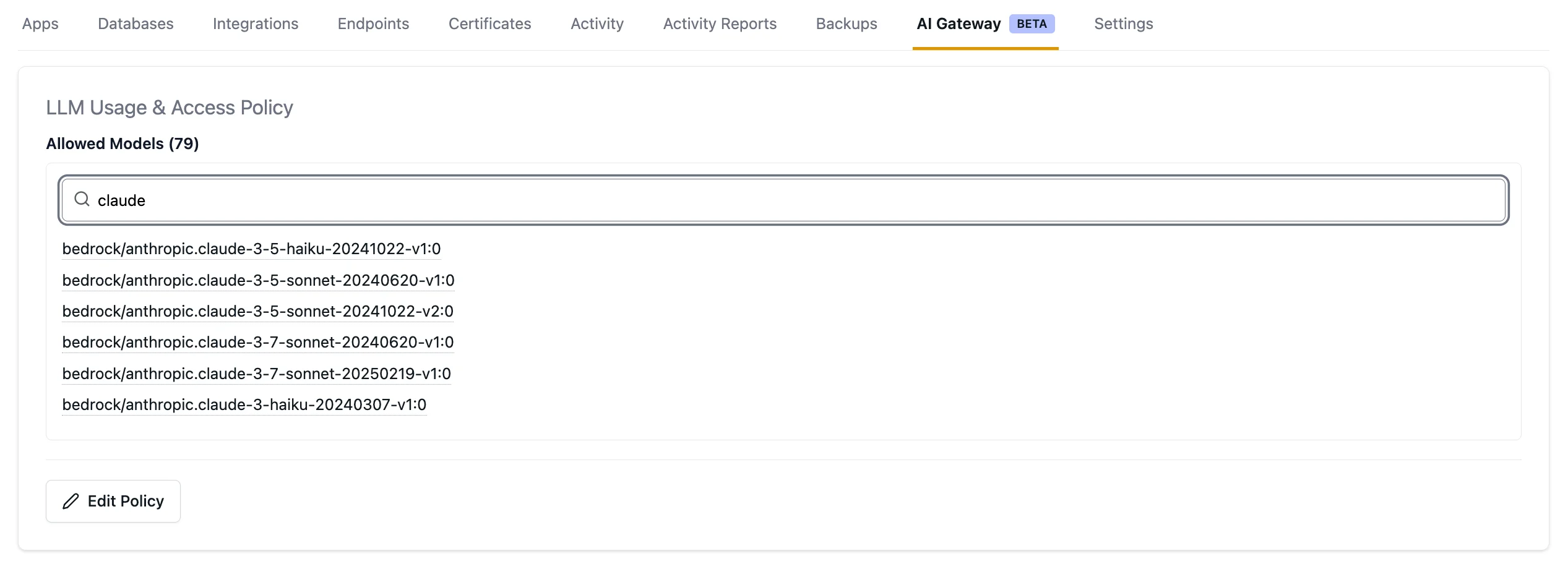 To configure a model access policy:
1. Navigate to your Environment in the Aptible dashboard
2. Click the **AI Gateway** tab
3. Click **Edit policy** and select the models you want to allow
Model availability is subject to change. Check the LLM Key Details in the [AI Gateway Dashboard](https://app.aptible.com/llm-keys) for the current list of available models.
To configure a model access policy:
1. Navigate to your Environment in the Aptible dashboard
2. Click the **AI Gateway** tab
3. Click **Edit policy** and select the models you want to allow
Model availability is subject to change. Check the LLM Key Details in the [AI Gateway Dashboard](https://app.aptible.com/llm-keys) for the current list of available models.