> ## Documentation Index
> Fetch the complete documentation index at: https://www.aptible.com/docs/llms.txt
> Use this file to discover all available pages before exploring further.
# Database Backups
> Learn how Aptible snapshot backups, retention policies, and restore workflows protect your managed databases.
# Overview
Aptible provides several backup and recovery features for managed databases:
* Automatic daily backups
* Manual backups
* Cross-region copy backups
* Final backups for deprovisioned databases
* [Point-in-Time Recovery (PITR) for PostgreSQL](/core-concepts/managed-databases/managing-databases/point-in-time-recovery)
All backups are compressed and encrypted. Snapshot-style backups are configured through the Environment's backup retention policy.
## How Backups Work
Aptible database backups are volume snapshots of the underlying database storage. Each snapshot is a read-only copy of the database volume captured when the backup is taken.
Once a snapshot is created, its contents do not change. You can restore, copy, or purge the snapshot according to the configured policy, but the backup itself remains immutable.
### Backup Portability
Aptible backups are not SQL dumps or compressed archive files. They are encrypted volume snapshots that rely on Aptible's database image, configuration, and restore tooling. Because of that design, Aptible-managed backups cannot be directly exported, mounted, or restored outside of Aptible.
If you need to move data to another platform or create a portable archive, export the data using database-native tools such as `pg_dump`, `pg_dumpall`, `mysqldump`, or the equivalent tool for your database engine.
If you plan to deprovision a Database but need to retain Aptible-managed backups for compliance or archival purposes, contact [Aptible Support](/how-to-guides/troubleshooting/aptible-support) before deprovisioning so the relevant automatic backups can be converted to manual backups. Automatic backups are purged when the Database is deprovisioned unless retained by the Environment's final backup policy or converted to manual backups.
## Automatic Backups
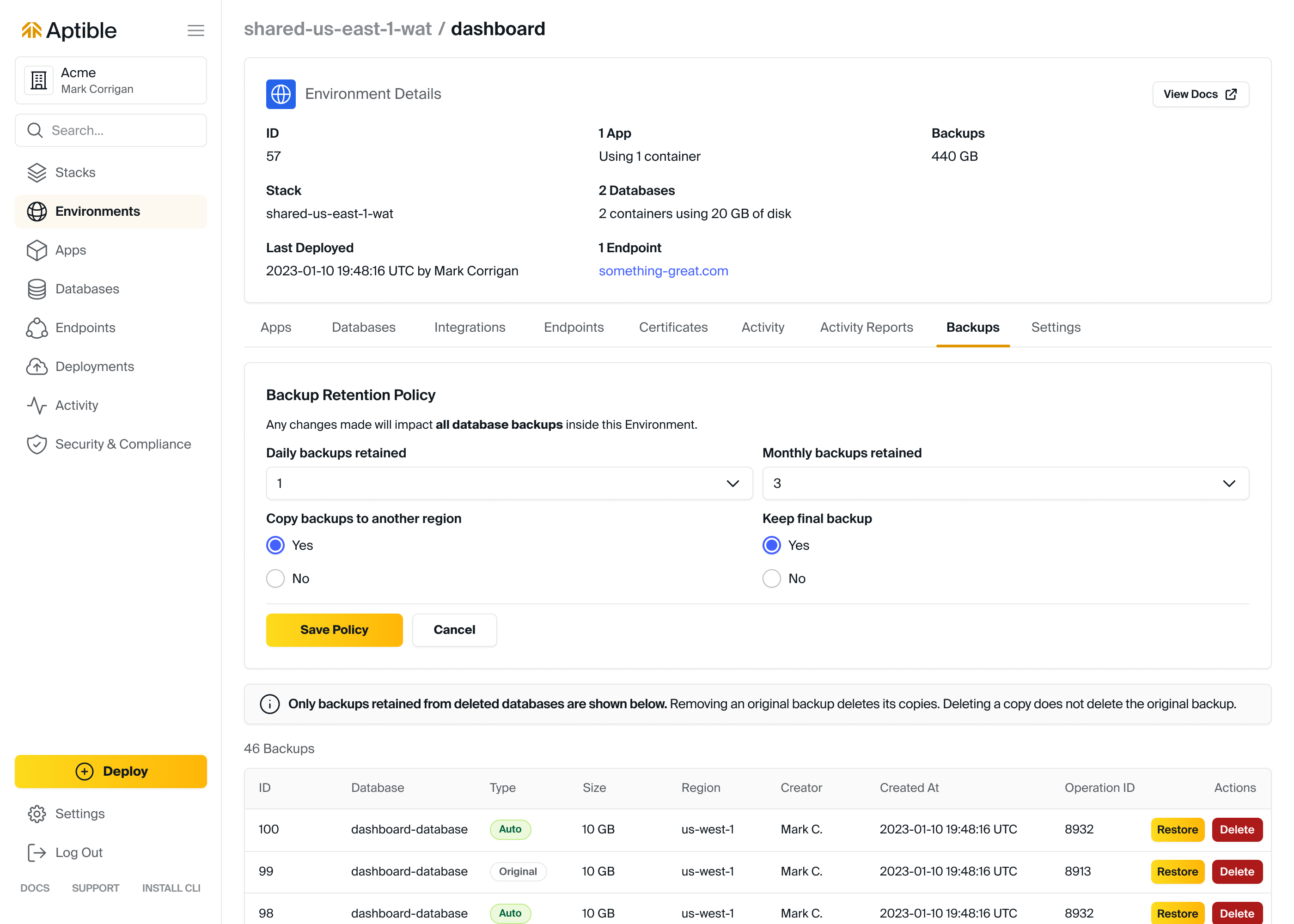
By default, Aptible creates an automatic backup of each database every 24 hours. Retention is controlled by the Environment's backup retention policy.
The policy includes these settings:
* **Daily backups retained**: Number of daily backups retained. Default: `30`
* **Monthly backups retained**: Number of monthly backups retained, using the last backup of each month. Default: `12`
* **Yearly backups retained**: Number of yearly backups retained, using the last backup of each year. Default: `6`
* **Copy backups to another region**: Whether Aptible copies backups in the Environment to another region. Default: disabled
* **Keep final backup for deprovisioned databases**: Whether Aptible keeps a final backup when a database is deprovisioned. Default: enabled
* **Point-in-time Recovery for PostgreSQL**: Whether PITR retention is enabled for supported PostgreSQL databases. Default: Enabled
* **Days of PITR data retained**: How many days of PostgreSQL WAL data are retained for PITR. Default: `1`
**Recommended backup retention policies**
**Production environments:** Daily backups retained: 14-30, Monthly backups retained: 12, Yearly backups retained: 5, Copy backups to another region: enabled as needed for DR, Keep final backup for deprovisioned databases: enabled
**Non-production environments:** Daily backups retained: 1-14, Monthly backups retained: 0, Yearly backups retained: 0, Copy backups to another region: disabled, Keep final backup for deprovisioned databases: disabled
## Backup Retention Policy for Automated Backups
Automatic backup retention and PostgreSQL PITR retention are configured at the Environment level through a shared backup retention policy.
You can modify the backup retention policy in these ways:
* In the Aptible Dashboard:
* Select the Environment
* Select the **Backups** tab
* Using the [`aptible backup_retention_policy:set`](/reference/aptible-cli/cli-commands/cli-backup-retention-policy-set) CLI command
* Using the Aptible [Terraform Provider](https://registry.terraform.io/providers/aptible/aptible/latest/docs)
PITR retention appears in the Dashboard as **Point-in-time Recovery for PostgreSQL** and **Days of PITR data retained**. These PITR controls are not self-service configurable today. The current visible values are **Enabled** and **1**. If you need longer retention, contact [Aptible Support](/how-to-guides/troubleshooting/aptible-support). For current PITR prerequisites, states, and restore guidance, see [Point-in-Time Recovery (PITR)](/core-concepts/managed-databases/managing-databases/point-in-time-recovery).
Reducing retained backups, PITR data retention, cross-region copies, or final backups automatically deletes backup data that no longer matches the policy. This can permanently remove recovery data and may violate your organization's internal compliance controls.
**Cost optimization tip:** [See this related blog for more recommendations for balancing continuity and costs](https://www.aptible.com/blog/backup-strategies-on-aptible-balancing-continuity-and-costs)
## Retention and Disposal
### Cross-region Copy Backups
When `COPY BACKUPS TO ANOTHER REGION` is enabled, Aptible copies backups in that Environment to a secondary region.
Cross-region copy backups improve redundancy for disaster recovery. To improve recovery time objective (RTO), consider maintaining a secondary Stack in the destination region so you can restore more quickly during a regional outage.
The current cross-region mapping is:
Aptible guarantees that data processing and storage occur only within the US for US Stacks and within the EU for EU Stacks.
| Originating region | Destination region(s) |
| :----------------- | :----------------------------- |
| us-east-1 | us-west-1, us-west-2 |
| us-east-2 | us-west-1, us-west-2 |
| us-west-1 | us-east-1 |
| us-west-2 | us-east-1 |
| sa-east-1 | us-east-2 |
| ca-central-1 | ca-west-1 (formerly us-east-2) |
| eu-west-1 | eu-central-1 |
| eu-west-2 | eu-central-1 |
| eu-west-3 | eu-central-1 |
| eu-central-1 | eu-west-1 |
| ap-northeast-1 | ap-northeast-2 |
| ap-northeast-2 | ap-northeast-1 |
| ap-southeast-1 | ap-northeast-2, ap-southeast-2 |
| ap-southeast-2 | ap-southeast-4 |
| ap-south-1 | ap-southeast-2 |
### Final Backups
When `KEEP FINAL BACKUP` is enabled, Aptible creates and retains one final backup when a database is deprovisioned. Final backups remain available as long as the Environment continues to retain them under policy.
We strongly recommend enabling final backups for production Environments.
### Excluding a Database from New Automatic Backups
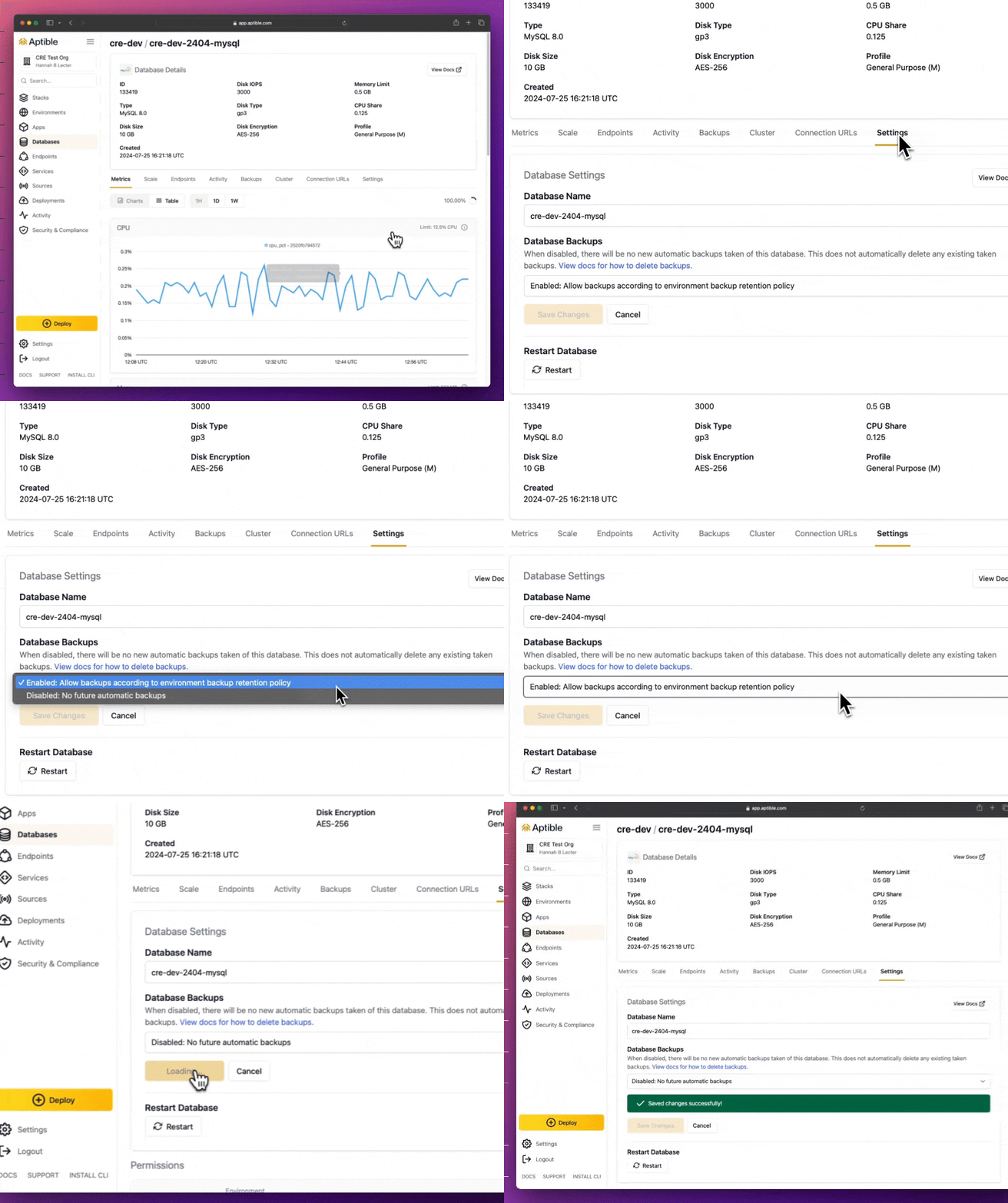 You can exclude an individual database from new automatic backups in the Aptible Dashboard from the database's **Settings** tab, or through the Aptible Terraform Provider.
If you disable backups for a database:
* Aptible stops taking new automatic backups for that database
* Aptible does not create a final backup during deprovisioning, even if the Environment policy normally retains final backups
* Existing backups are not deleted automatically
To purge older backups yourself:
* Use [`aptible backup:list DB_HANDLE`](/reference/aptible-cli/cli-commands/cli-backup-list) to identify backups
* Use [`aptible backup:purge BACKUP_ID`](/reference/aptible-cli/cli-commands/cli-backup-purge) to delete them
* Or export output as JSON:
```bash theme={null}
APTIBLE_OUTPUT_FORMAT=json aptible backup:list DB_HANDLE
```
## Manual Backups
Manual backups can be created at any time and are retained until you explicitly delete them, even after the source database is deprovisioned.
## Purging Backups
Automatic backups are permanently deleted when the associated database is deprovisioned unless retained as final backups. Final backups and cross-region copies that no longer match policy are also purged automatically. This cleanup process can take up to 1 hour.
You can also manually delete individual backups.
## Restoring from a Backup
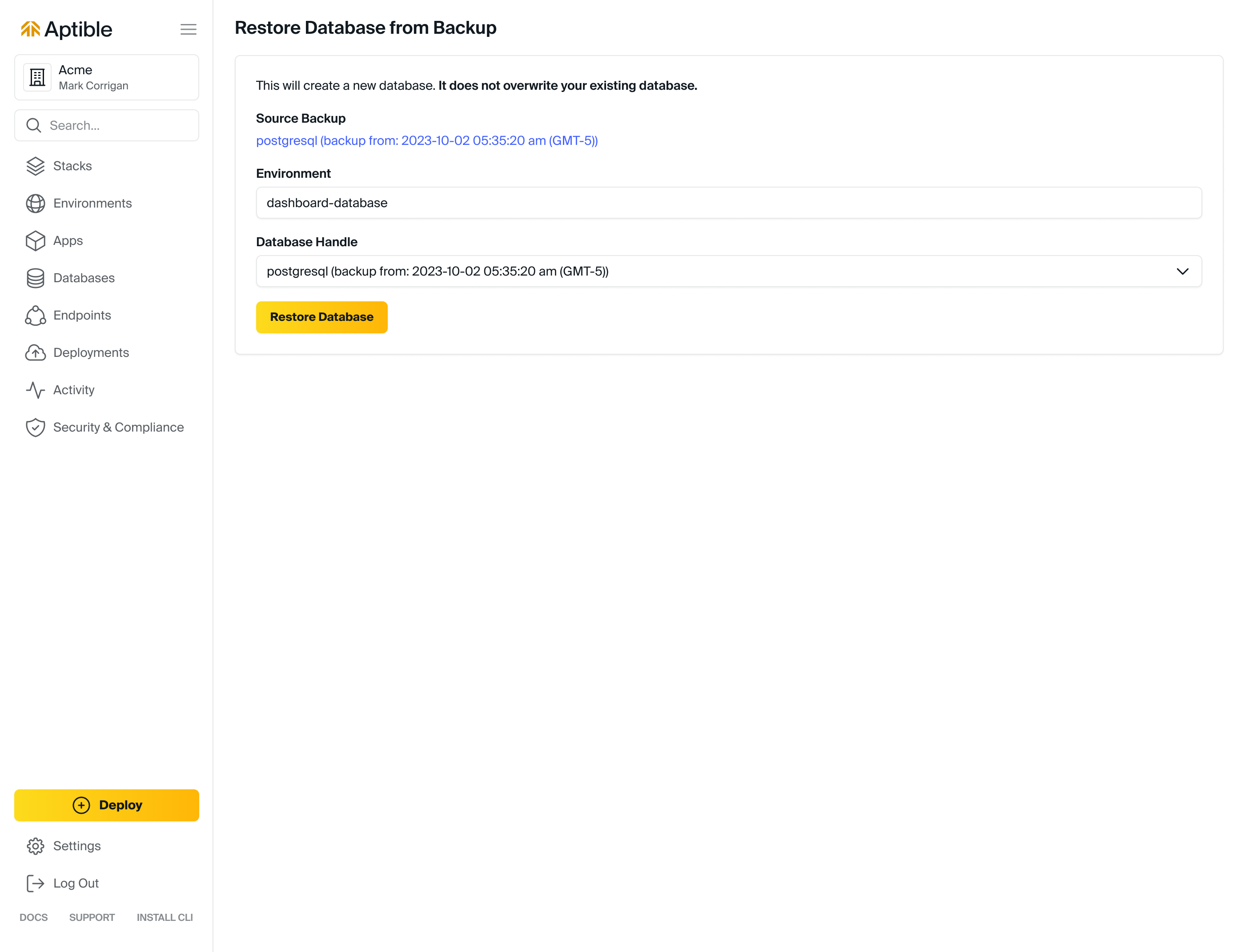
Restoring from a backup creates a new database from the backed-up data. It does not replace or modify the source database.
By default, restored databases are created as a 1 GB [General Purpose (M) Container Profile](/core-concepts/scaling/container-profiles#default-container-profile), though you can specify container size and profile with [`aptible backup:restore`](/reference/aptible-cli/cli-commands/cli-backup-restore).
Databases backups are stored as EBS snapshots. Databases restored from a backup can initially have degraded disk performance, as described in AWS's ["Restoring from an Amazon EBS snapshot" documentation](https://docs.aws.amazon.com/prescriptive-guidance/latest/backup-recovery/restore.html). If you are using a restored database for performance testing, run the test twice: once to warm the restored volume, and a second time to measure steady-state performance. Restoring in the same region as the original backup generally minimizes initialization time.
If you have special retention needs, such as a litigation hold, contact [Aptible Support](/how-to-guides/troubleshooting/aptible-support).
## Point-in-Time Recovery for PostgreSQL
Point-in-Time Recovery (PITR) is a feature available specifically for Aptible Managed **PostgreSQL** databases, allowing recovery to specific points in time, independent of automated, scheduled backups.
Visit the dedicated [Point-in-Time Recovery (PITR)](/core-concepts/managed-databases/managing-databases/point-in-time-recovery) page to learn how to make the most of this feature.
## Encryption
Aptible's built-in [Database Encryption](/core-concepts/managed-databases/managing-databases/database-encryption/overview) applies automatically to backups of a given database.
## FAQ
Backup retention policies can be modified in one of these ways:
* Within the Aptible Dashboard:
* Select the Environment
* Select the **Backups** tab
* Using the [`aptible backup_retention_policy:set`](/reference/aptible-cli/cli-commands/cli-backup-retention-policy-set) CLI command
* Using the Aptible [Terraform Provider](https://registry.terraform.io/providers/aptible/aptible/latest/docs)
You can exclude an individual database from new automatic backups in the Aptible Dashboard from the database's **Settings** tab, or through the Aptible Terraform Provider.
If you disable backups for a database:
* Aptible stops taking new automatic backups for that database
* Aptible does not create a final backup during deprovisioning, even if the Environment policy normally retains final backups
* Existing backups are not deleted automatically
To purge older backups yourself:
* Use [`aptible backup:list DB_HANDLE`](/reference/aptible-cli/cli-commands/cli-backup-list) to identify backups
* Use [`aptible backup:purge BACKUP_ID`](/reference/aptible-cli/cli-commands/cli-backup-purge) to delete them
* Or export output as JSON:
```bash theme={null}
APTIBLE_OUTPUT_FORMAT=json aptible backup:list DB_HANDLE
```
## Manual Backups
Manual backups can be created at any time and are retained until you explicitly delete them, even after the source database is deprovisioned.
## Purging Backups
Automatic backups are permanently deleted when the associated database is deprovisioned unless retained as final backups. Final backups and cross-region copies that no longer match policy are also purged automatically. This cleanup process can take up to 1 hour.
You can also manually delete individual backups.
## Restoring from a Backup
Restoring from a backup creates a new database from the backed-up data. It does not replace or modify the source database.
By default, restored databases are created as a 1 GB [General Purpose (M) Container Profile](/core-concepts/scaling/container-profiles#default-container-profile), though you can specify container size and profile with [`aptible backup:restore`](/reference/aptible-cli/cli-commands/cli-backup-restore).
Databases backups are stored as EBS snapshots. Databases restored from a backup can initially have degraded disk performance, as described in AWS's ["Restoring from an Amazon EBS snapshot" documentation](https://docs.aws.amazon.com/prescriptive-guidance/latest/backup-recovery/restore.html). If you are using a restored database for performance testing, run the test twice: once to warm the restored volume, and a second time to measure steady-state performance. Restoring in the same region as the original backup generally minimizes initialization time.
If you have special retention needs, such as a litigation hold, contact [Aptible Support](/how-to-guides/troubleshooting/aptible-support).
## Point-in-Time Recovery for PostgreSQL
Point-in-Time Recovery (PITR) is a feature available specifically for Aptible Managed **PostgreSQL** databases, allowing recovery to specific points in time, independent of automated, scheduled backups.
Visit the dedicated [Point-in-Time Recovery (PITR)](/core-concepts/managed-databases/managing-databases/point-in-time-recovery) page to learn how to make the most of this feature.
## Encryption
Aptible's built-in [Database Encryption](/core-concepts/managed-databases/managing-databases/database-encryption/overview) applies automatically to backups of a given database.
## FAQ
Backup retention policies can be modified in one of these ways:
* Within the Aptible Dashboard:
* Select the Environment
* Select the **Backups** tab
* Using the [`aptible backup_retention_policy:set`](/reference/aptible-cli/cli-commands/cli-backup-retention-policy-set) CLI command
* Using the Aptible [Terraform Provider](https://registry.terraform.io/providers/aptible/aptible/latest/docs)
 You can view automatic backups in two ways:
* Using the [`aptible backup:list`](/reference/aptible-cli/cli-commands/cli-backup-list) command
* Within the Aptible Dashboard by navigating to the database's **Backups** tab
Final backups can be viewed in two ways:
* Using the [`aptible backup:orphaned`](/reference/aptible-cli/cli-commands/cli-backup-orphaned) command
* Within the Aptible Dashboard by navigating to the Environment's **Backup Management** tab and selecting **Retained Backups of Deleted Databases**
Manual backups can be created in two ways:
* Using the [`aptible db:backup`](/reference/aptible-cli/cli-commands/cli-db-backup) command
* Within the Aptible Dashboard by navigating to the database's **Backup Management** tab and selecting **Create Backup**
Backups can be deleted in these ways:
* Using the [`aptible backup:purge`](/reference/aptible-cli/cli-commands/cli-backup-purge) command
* For active databases, in the Aptible Dashboard:
* Navigate to the Environment
* Select the database
* Select the **Backups** tab
* Select **Permanently remove this backup** for the backup you want to delete
* For deprovisioned databases, in the Aptible Dashboard:
* Navigate to the Environment
* Select the **Backup Management** tab
* Select **Delete** for the backup you want to remove
You can view automatic backups in two ways:
* Using the [`aptible backup:list`](/reference/aptible-cli/cli-commands/cli-backup-list) command
* Within the Aptible Dashboard by navigating to the database's **Backups** tab
Final backups can be viewed in two ways:
* Using the [`aptible backup:orphaned`](/reference/aptible-cli/cli-commands/cli-backup-orphaned) command
* Within the Aptible Dashboard by navigating to the Environment's **Backup Management** tab and selecting **Retained Backups of Deleted Databases**
Manual backups can be created in two ways:
* Using the [`aptible db:backup`](/reference/aptible-cli/cli-commands/cli-db-backup) command
* Within the Aptible Dashboard by navigating to the database's **Backup Management** tab and selecting **Create Backup**
Backups can be deleted in these ways:
* Using the [`aptible backup:purge`](/reference/aptible-cli/cli-commands/cli-backup-purge) command
* For active databases, in the Aptible Dashboard:
* Navigate to the Environment
* Select the database
* Select the **Backups** tab
* Select **Permanently remove this backup** for the backup you want to delete
* For deprovisioned databases, in the Aptible Dashboard:
* Navigate to the Environment
* Select the **Backup Management** tab
* Select **Delete** for the backup you want to remove
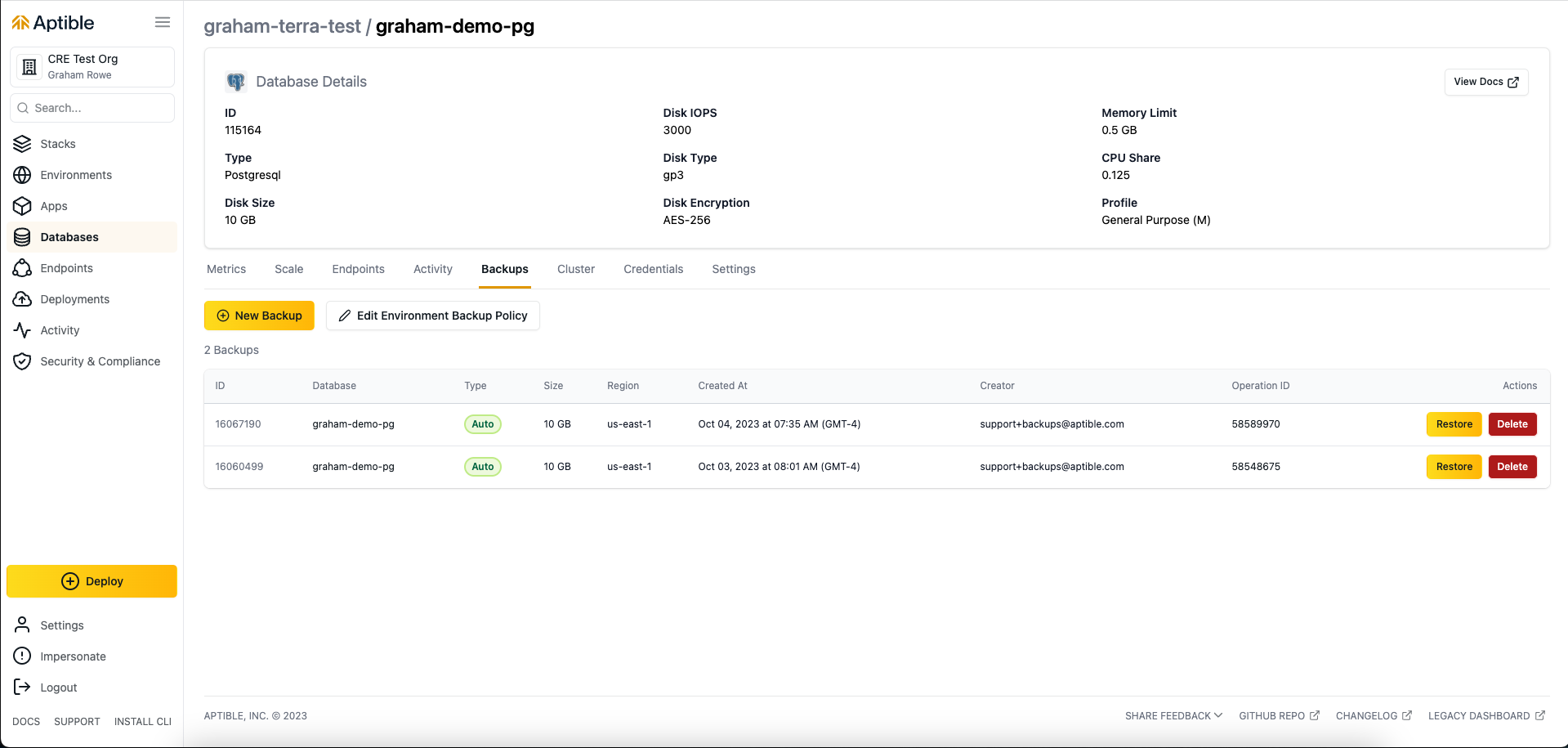 * Navigate to the database
* Select the **Settings** tab
* Choose **Disabled: No new backups allowed** within **Database Backups**
A typical production policy might look like this:
* Yearly backups retained: 0-6
* Monthly backups retained: 3-12
* Daily backups retained: 15-60
A typical non-production policy might look like this:
* Yearly backups retained: 0
* Monthly backups retained: 0-1
* Daily backups retained: 1-7
To optimize costs, it is usually best to disable cross-region copy backups and final backups in non-production environments.
You can restore a backup in these ways:
* Using the [`aptible backup:restore`](/reference/aptible-cli/cli-commands/cli-backup-restore) command
* For active databases, within the Aptible Dashboard:
* Navigate to the Environment
* Select the database
* Select the **Backups** tab
* Select **Restore to a New Database** from the backup you want to restore
* For deprovisioned databases, within the Aptible Dashboard:
* Navigate to the Environment
* Select the **Backup Management** tab
* Select **Restore to a New Database** for the backup you want to restore
* Navigate to the database
* Select the **Settings** tab
* Choose **Disabled: No new backups allowed** within **Database Backups**
A typical production policy might look like this:
* Yearly backups retained: 0-6
* Monthly backups retained: 3-12
* Daily backups retained: 15-60
A typical non-production policy might look like this:
* Yearly backups retained: 0
* Monthly backups retained: 0-1
* Daily backups retained: 1-7
To optimize costs, it is usually best to disable cross-region copy backups and final backups in non-production environments.
You can restore a backup in these ways:
* Using the [`aptible backup:restore`](/reference/aptible-cli/cli-commands/cli-backup-restore) command
* For active databases, within the Aptible Dashboard:
* Navigate to the Environment
* Select the database
* Select the **Backups** tab
* Select **Restore to a New Database** from the backup you want to restore
* For deprovisioned databases, within the Aptible Dashboard:
* Navigate to the Environment
* Select the **Backup Management** tab
* Select **Restore to a New Database** for the backup you want to restore