

Coming soon: Aptible WAF is currently in development and available in early access.
Overview
Aptible is introducing a managed web application firewall (WAF) that sits in front of public Endpoints on Aptible. It inspects incoming network traffic before it reaches your application.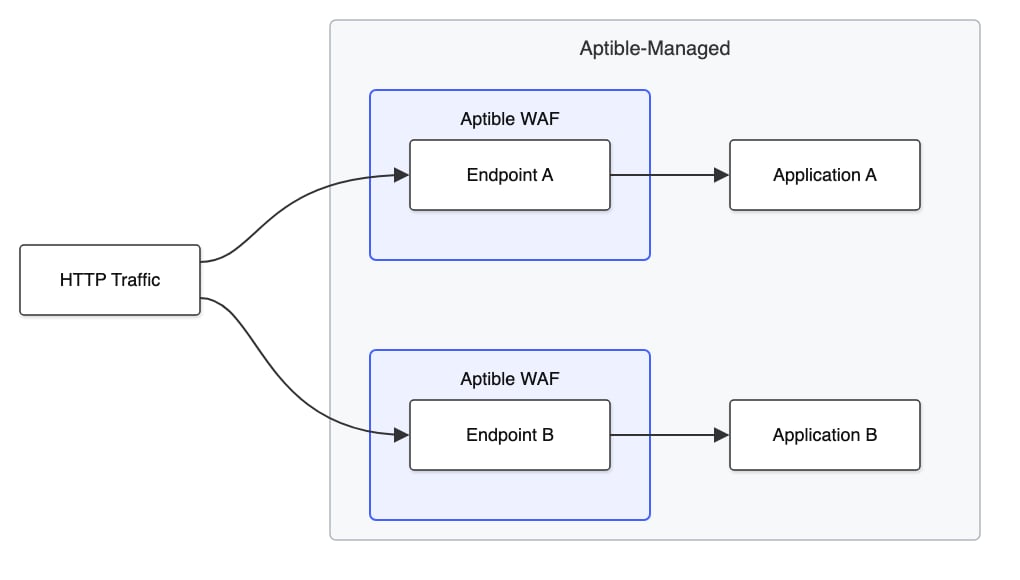
- Baseline Protections: Rules Aptible manages on your behalf, enabled by default.
- Custom Rules: Rules managed by the customer, configured per Endpoint.
Baseline Protections
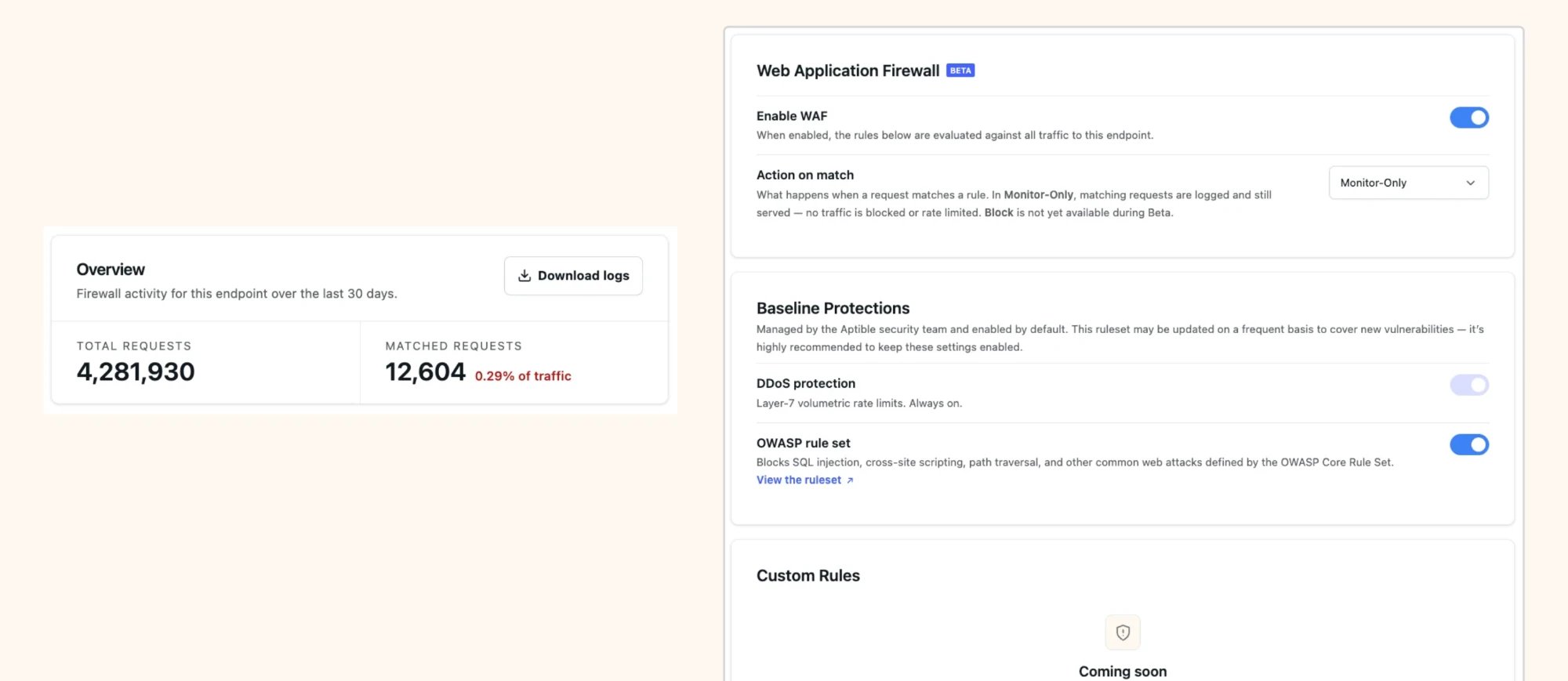
Aptible provides a set of Baseline Protections everywhere WAF is enabled. This includes a set of controls enabled by default:- DDoS protection: Layer-7 volumetric rate limiting. Enforced/always-on.
- OWASP rule set: Blocks SQL injection, cross-site scripting, path traversal, and other attacks covered by the OWASP Top 10.
- IP Reputation rule set: Blocks traffic from IP addresses that AWS identifies as sources of bots, scanners, and other threats. Aptible leverages AWS’s managed IP reputation list; see AWS’s documentation for more information.
- Known bad inputs rule set: Blocks request patterns known to be invalid and commonly associated with exploitation attempts or vulnerability discovery. Aptible leverages AWS’s managed known bad inputs rule set; see AWS’s documentation for more information.
Coming soon: Aptible managed rules with auto-updates to help mitigate new CVEs, reviewed and managed by the Aptible security team. See Early access for more information.
Enabling WAF
Each Endpoint has its own Enable WAF toggle, with an Action on match setting that controls what happens to a request that matches a rule:- Monitor-Only: Matching requests are logged as what would have been blocked or rate-limited, but are still served normally.
- Block: Matching traffic is blocked or rate-limited as configured.
Logging
Aptible WAF logs every request that matches a rule, in both Monitor-Only and Block mode. For Monitor-Only mode, logs reflect your current rules: when you add or change a rule, matched events update to show what would have been blocked under the new configuration.Example log output for WAF event
Example log output for WAF event
Coming soon: Official log drain support. See Early access for more information.
Custom Rules
Coming soon: Custom Rules. See Early access for more information.
Early access
Read more about WAF in early access
Read more about WAF in early access
Interested in being a design partner? Contact Aptible Support to get started.
- Per-Endpoint configuration: WAF is configured per Endpoint. Only dedicated Endpoints are currently supported; Shared Endpoints are coming soon.
- Monitor-Only mode: Available to all design partners by default.
- Downloadable logs via the UI: Available to all design partners. These cover matched (blocked) events only, not every request. Design partners are encouraged to review these logs to report false positives and the custom rules they need.
- Managed via the Aptible Dashboard: Currently, Aptible WAF can only be enabled, configured, and managed via the Aptible Dashboard. CLI and Terraform support will be available later on.
Why is Block limited availability and how can you get access?
Why is Block limited availability and how can you get access?
Block mode carries risk during development: enforcing it without the right controls in place can produce false positives that block legitimate requests.To get access:
- You review your Monitor-Only logs and tell Aptible which custom rules you need.
- Aptible may enable Block mode once those rules exist, and the customer agrees to the limited availability use.
- If you’re using Block and find you don’t have the controls to take granular action, such as a custom rule to address a false positive, the recommended action is to disable WAF and report the findings to Aptible.
What’s planned
The following is planned for Aptible WAF. This list is subject to change.Aptible is looking for feedback from design partners on what’s most important here, to prioritize and add support accordingly. Contact Aptible Support to weigh in.
Custom Rules
- Bypass list: Traffic from allowlisted IP ranges skips every other WAF rule. DDoS protection still applies.
- Blocklist by source IP: Reject requests from specific CIDR ranges with a 403.
- Blocklist by User-Agent: Block known automated clients, such as bots and scanners, or your own custom signatures.
- Geo-restrictions: Block or allow requests based on the source IP’s country.
- Rate limiting by source IP: Throttle each client IP independently.
- Rate limiting by User-Agent: Throttle named automated clients, such as search engine crawlers, without throttling legitimate traffic.
Other improvements
- Support for Shared Endpoints.
- Official log drain support for WAF events, covering both blocked and allowed traffic.
- Managing default WAF rules per environment or across an entire organization.
- CLI and Terraform support.
Requesting access
Aptible WAF is available to design partners only. Contact Aptible Support to learn more and join the design partner program.FAQ
What's Aptible's recommendation for securing private Endpoints?
What's Aptible's recommendation for securing private Endpoints?
Aptible WAF can be enabled for both public and private Endpoints. Its primary use case is public Endpoints exposed to the internet. For private Endpoints, you can enable WAF and/or set up IP Filtering at the Endpoint level.
What is the cost of Aptible WAF?
What is the cost of Aptible WAF?
Aptible WAF is free to use during early access.Pricing for GA is not yet available. Contact us to be subscribed to updates or to join our early access program.